Securing your home or rental property with a smart lock seems like a straightforward upgrade. Yet, when you start exploring options, it quickly becomes more complex than expected.
You may have experienced the challenge of picking the right smart lock. There are many choices that look similar but differ in compatibility, installation ease, and smart features. Some models fit existing locks without damage, while others require more effort. Battery life, remote access, voice control, and security encryption vary too. Balancing convenience, security, and budget can feel like a puzzle.
This article aims to clear up that confusion. It will help you understand key factors and trade-offs, so you can decide what suits your door and lifestyle best.
What Matters Most When Choosing A Smart Lock
Compatibility with your existing lock and installation method are crucial. Features like auto-lock timers, remote control, and voice assistant support add convenience but may require additional hubs or accessories. Battery life and security encryption ensure reliable and safe operation. Knowing which features you need will simplify your choice.
The products ahead are grouped by their main strengths and intended uses. Different needs call for different solutions. This guide will help you match those to your situation without overwhelming details.
Switchbot Smart Lock Keyless Deadbolt
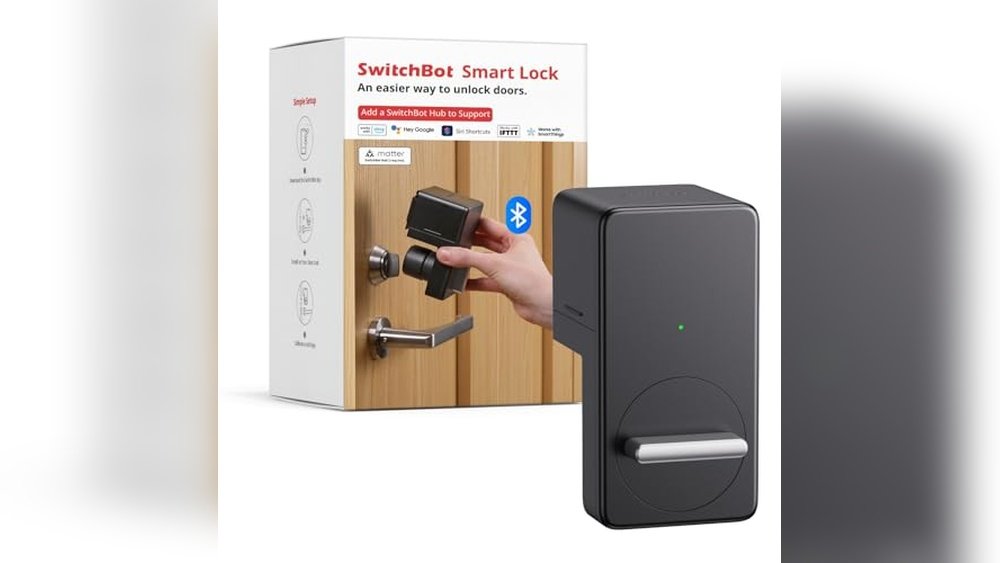
The SwitchBot Smart Lock is ideal for Airbnb hosts and vacation rental owners looking to upgrade to keyless, Bluetooth-enabled door security.

The SwitchBot Smart Lock is a Bluetooth electronic deadbolt designed to replace traditional keys with a secure, keyless entry solution. It addresses the hassle of lost keys and the inconvenience of managing physical copies, especially for vacation rentals. Its standout feature is the easy installation using 3M adhesive, requiring no tools or drilling for most standard locks.
Using this smart lock feels seamless, offering peace of mind with reliable auto-lock timers and remote access via the SwitchBot app. The lock’s encryption ensures security, and its long battery life means you won’t need to worry about frequent replacements. I found it straightforward to share access with guests and family, making day-to-day management simple and efficient.
Key Advantages
- Quick, tool-free installation with adhesive or optional drilling
- Customizable auto-lock timers to secure doors automatically
- Secure ATS-128-CTR encryption for reliable protection
- Long-lasting battery life up to 180 days under normal use
- Apple Home and Siri integration available with SwitchBot Hub
- Free replacement warranty for hardware quality issues
Who Should Consider This Lock
This smart lock is perfect for Airbnb hosts and vacation rental owners who want to simplify guest access without changing existing door hardware extensively. It suits anyone looking for a secure, reliable keyless entry option with easy setup and app control.
However, if your door lock or structure isn’t compatible with adhesive installation or Bluetooth control, or you require universal compatibility, this lock might not be the best fit. Make sure to verify your door’s dimensions and mounting clearance before purchasing.
By choosing this lock, you eliminate the stress of lost keys and complicated guest management. A practical tip is to measure your door gap carefully (should be ≤ 30mm) to ensure the auto-lock feature works flawlessly. Rest assured, SwitchBot offers dedicated customer support and warranty coverage to help you resolve any issues quickly.
Switchbot Smart Lock Pro Deadbolt
The SwitchBot Smart Lock is perfect for renters and homeowners looking to upgrade their door security with smart, keyless convenience.

The SwitchBot Smart Lock Pro is a keyless electronic deadbolt designed to retrofit onto most North American single-cylinder deadbolts without drilling. It solves the hassle of carrying keys and adds smart home integration by supporting voice control through Alexa, Google Assistant, and Matter compatibility when paired with the SwitchBot Hub 2. This lock’s auto-lock and auto-unlock features enhance security and convenience, making daily entry seamless.
Installing and using the SwitchBot Smart Lock Pro feels straightforward and reliable. The app’s calibration options and Bluetooth connectivity provide smooth operation, and the long battery life means less frequent maintenance. I appreciated how it quietly secures the door automatically and works well with other SwitchBot devices, giving me confidence in its performance day to day.
Key Strengths
- Easy retrofit installation without drilling, ideal for renters
- Supports voice control with Alexa, Google, and Matter via SwitchBot Hub 2
- Auto-lock and auto-unlock features enhance security and convenience
- Long battery life of 6–9 months, extendable with optional power pack
- Integrates with SwitchBot ecosystem for multiple unlock methods including fingerprint and passcode
Who Should Consider This Lock
This smart lock is well suited for anyone wanting to upgrade an existing deadbolt without changing the entire lock or drilling new holes. Renters, in particular, will appreciate the non-destructive installation. If you use smart home assistants or want remote and voice control features, this lock fits those needs well.
However, if your door uses a deadbolt type not compatible with this retrofit design, or if you prefer a lock with built-in Wi-Fi (without needing a hub), you might want to explore other options. Also, users should ensure their smartphone and door alignment support the auto-unlock feature for best results.
Installing the SwitchBot Smart Lock Pro removes the confusion of managing physical keys and adds peace of mind by automatically securing your door. A practical tip is to pair it with the SwitchBot Hub 2 for full smart home voice control and Matter support, maximizing its capabilities. You can feel assured knowing this lock combines ease of use with proven security features in a compact design.
Switchbot Smart Lock Ultra Deadbolt
The SwitchBot Smart Lock is ideal for apartment and home owners seeking secure, keyless convenience combined with smart home compatibility.

The SwitchBot Smart Lock Ultra Deadbolt is a versatile, app-controlled door lock designed to upgrade your home security without replacing your existing lock core. It solves the problem of inconvenient key management by offering ultra-fast fingerprint recognition and multiple unlocking methods, making access effortless and secure.
Using this lock feels seamless and reassuring. The quiet motor operation at night and its compatibility with Alexa, Google Assistant, and Apple HomeKit provide confidence and ease of control. I appreciate how it saves time by eliminating fumbling for keys while maintaining a strong security presence.
- Compatible with most apartment door locks, including Jimmy Proof and Mortise locks
- Long-lasting battery life with a triple power system providing up to 12 months of use
- Supports up to 100 fingerprints with 0.3-second recognition speed
- Works with major smart home ecosystems including Matter, Apple HomeKit, Alexa, and Google Assistant
- 6-layer security system with magnetic automatic locking and detailed app lock status
Who Should Consider This Smart Lock
This smart lock is perfect for apartment dwellers and homeowners who want a hassle-free upgrade to keyless entry without changing their existing lock hardware. It suits tech-savvy users who value fast fingerprint access and smart home integration.
However, those with very specialized or uncommon lock types may want to verify compatibility first. If you prefer a simpler keypad-only lock without app control or fingerprint features, other options might be more straightforward.
Installing the SwitchBot Smart Lock removes confusion about lost or shared keys and adds peace of mind with remote monitoring. A practical tip is to pair it with the SwitchBot Hub mini to unlock the full range of remote and voice control features. Rest assured, the detailed app notifications keep you informed of your lock’s status anytime.
Switchbot Smart Lock Bluetooth Deadbolt
The SwitchBot Smart Lock is an ideal keyless entry solution for homeowners and Airbnb hosts seeking convenient and secure front door access.

The SwitchBot Smart Lock is a Bluetooth-enabled electronic deadbolt designed to convert your existing front door lock into a keyless entry system. It solves the hassle of lost or forgotten keys by allowing you to lock and unlock your door remotely, with the added convenience of auto-lock timers. One standout feature is its easy installation that requires no tools, simply attaching via 3M adhesive, making it a straightforward upgrade without damaging your current lock.
Using the SwitchBot Smart Lock daily brings peace of mind with reliable encryption and real-time app notifications. Its battery life can last up to 180 days, reducing maintenance worries. I appreciate how the app’s Home Sharing feature lets trusted family members access the lock seamlessly, making it perfect for vacation rentals or busy households.
- Easy, tool-free installation with optional drilling support
- Auto-lock with customizable timers for enhanced security
- Compatible with Apple Home and Siri via SwitchBot Hub (sold separately)
- Long battery life with up to 180 days of use
- Secure ATS-128-CTR encryption protects your access
- Not universally compatible—requires checking your existing lock’s dimensions
Who Should Consider the SwitchBot Smart Lock?
This smart lock is well-suited for homeowners or Airbnb hosts who want a simple, non-invasive way to upgrade their front door security with keyless convenience. If you have a compatible deadbolt and want to share access easily without handing out physical keys, this product fits well. However, if your door lock structure is unusual or the magnet-to-lock gap exceeds 30mm, this lock may not work reliably.
It removes confusion around lost keys and adds remote control capabilities without complicated installation. A practical tip is to verify your lock type and dimensions before purchasing to ensure a smooth fit. If you encounter any issues, SwitchBot’s customer support and warranty offer helpful guidance and free hardware replacements within the warranty period, providing peace of mind.
Switchbot Smart Lock Matte Black
The Switchbot Smart Lock is perfect for homeowners seeking a secure, easy-to-use keyless entry solution that fits existing deadbolts.

The SwitchBot Smart Lock is a Wi-Fi enabled deadbolt that upgrades your front door with keyless entry and remote control. It solves the problem of traditional keys by allowing you to unlock your door via app, voice commands, or a wireless keypad. One standout feature is its ability to create one-time or temporary passwords, ensuring secure access for visitors or emergency situations.
Using this smart lock feels straightforward and reassuring. Installation is tool-free with adhesive mounting, so you don’t have to replace your original deadbolt or hire a professional. I found it easy to manage access remotely and receive status notifications, giving peace of mind whether at home or away.
- Easy, tool-free installation with 3M adhesive
- Remote control via app and voice assistants (Google, Siri, Alexa)
- Creates temporary and emergency passwords with alerts
- Auto-lock feature saves time and enhances security
- Waterproof design (IP65) suitable for outdoor use
- Long battery life (~180 days with average usage)
Who This Lock Is For
This lock suits anyone wanting to modernize their existing deadbolt without complex installation or changing hardware. If you value remote access, multiple user codes, and smart home integration, this is a solid choice. However, if you prefer full replacement locks or do not have compatible deadbolts, it might not fit your needs.
SwitchBot Smart Lock removes the confusion of managing physical keys and provides a clear, secure way to control your front door remotely. A practical tip is to pair it with the SwitchBot Hub Mini for enhanced remote features. Rest assured, the encryption and notifications keep your home access safe and transparent at all times.
How To Choose The Right Switchbot Smart Lock For Your Door
Consider your existing door lock type and compatibility before selecting a model. Think about the balance between features like remote access, voice control, and battery life. Also, weigh the ease of installation against the level of security you need. Prioritize the smart lock that fits your lifestyle and technical comfort.
Common Mistakes And Who Should Avoid Switchbot Smart Locks
- Expecting universal compatibility without verifying your door lock type and dimensions.
- Assuming voice control works without the necessary hubs or proper setup.
- Choosing a smart lock without considering battery replacement or power options.
- Looking for a fully silent lock when some models have audible feedback.
- Buying smart locks for non-standard or commercial doors not supported by these models.
Switchbot Smart Lock: Frequently Asked Questions
Do I need additional devices to use voice commands with SwitchBot Smart Locks?
Yes, most voice control features require a compatible SwitchBot Hub within Bluetooth range. Without the hub, voice commands and remote access may not function.
Can I install a SwitchBot Smart Lock without drilling into my door?
Many models use 3M adhesive for installation, making drilling optional. However, compatibility depends on your existing lock and door structure.
How long do the batteries typically last on these smart locks?
Battery life varies by model and usage but generally ranges from 6 months to a year. Low battery alerts help ensure timely replacements.
Are SwitchBot Smart Locks compatible with all deadbolt types?
No, compatibility depends on the deadbolt type and dimensions. It’s important to verify this before purchase to avoid installation issues.
What should I do if my lock jams or malfunctions?
First, update the lock’s firmware to the latest version. If issues persist, contact customer support for troubleshooting and possible replacement under warranty.
Can I share access with family or guests using SwitchBot Smart Locks?
Yes, the SwitchBot app allows secure home sharing for multiple users. Access can be managed and monitored remotely.
Do these locks support integration with smart home ecosystems like Apple Home or Alexa?
Integration is possible but often requires additional devices like the SwitchBot Hub or Hub 2. Check specific model requirements for compatibility.
Final Thoughts On Choosing A Switchbot Smart Lock
Choosing a smart lock is about matching technology to your door and daily habits. With careful consideration of your lock type, desired features, and installation preferences, you can find a solution that fits well.
Take your time to understand what each model offers and how it aligns with your needs. This thoughtful approach will help you feel confident in your choice and enjoy the convenience and security these devices provide.